Laravel Login Packages (UI and Backend)
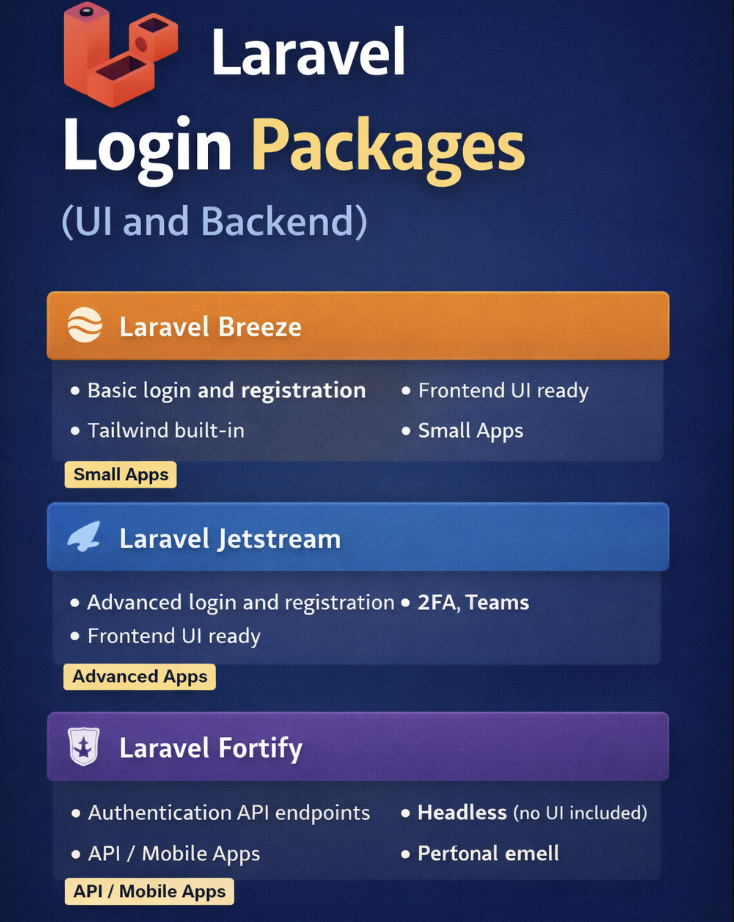
Authentication is one of the most common tasks in any web app: login, registration, password reset, and user management. While Laravel’s default Auth scaffolding is great, sometimes you want a ready-made package that provides both the frontend UI and backend functionality, saving you hours of setup.
1. Laravel Breeze
Overview: Lightweight official Laravel package for authentication. Perfect for small to medium apps.
Features:
-
Login, registration, password reset
-
Email verification
-
Frontend scaffolding using Blade or Inertia.js with Vue
-
Tailwind CSS ready
Installation & Demo:
# 1. Install Breeze
composer require laravel/breeze --dev
# 2. Install Breeze with Blade UI
php artisan breeze:install
# 3. Install frontend dependencies
npm install && npm run dev
# 4. Run migrations
php artisan migrate
# 5. Start server
php artisan serve
✅ Navigate to http://localhost:8000/register or /login to see the fully working UI.
Why use it: Fast, clean, and minimal UI that’s ready for customization.
2. Laravel Jetstream
Overview: A more robust package for medium to large apps with security features like two-factor authentication and team management.
Features:
-
Login, registration, password reset, email verification
-
Two-factor authentication (2FA)
-
Team management
-
Frontend via Blade or Inertia.js (Vue/React)
Installation & Demo:
# 1. Install Jetstream
composer require laravel/jetstream
# 2. Install Jetstream with Livewire or Inertia
php artisan jetstream:install livewire
# OR
php artisan jetstream:install inertia
# 3. Install frontend dependencies
npm install && npm run dev
# 4. Run migrations
php artisan migrate
# 5. Serve the app
php artisan serve
✅ Visit /register or /login to see the complete authentication workflow, including email verification and 2FA setup.
Why use it: Ideal when building secure apps or apps with teams and advanced features.
3. Laravel Fortify
Overview: Backend-only authentication package by Laravel. Perfect for API-driven or mobile-first apps.
Features:
-
Provides backend routes for login, registration, password reset
-
Multi-factor authentication support
-
Works with any frontend framework (Vue, React, Flutter, etc.)
Installation & Demo:
# 1. Install Fortify
composer require laravel/fortify
# 2. Publish configuration
php artisan vendor:publish --provider="Laravel\Fortify\FortifyServiceProvider"
# 3. Enable features in config/fortify.php
'features' => [
Features::registration(),
Features::resetPasswords(),
Features::emailVerification(),
Features::twoFactorAuthentication(),
];
# 4. Run migrations if not done
php artisan migrate
# 5. Serve the app
php artisan serve
✅ Fortify provides API endpoints like /login, /register, /forgot-password that you can call from your frontend (e.g., Vue or Flutter).
Why use it: Perfect for headless apps or custom UI where you control the frontend completely.
Choosing the Right Package
| Package | UI Included | Best For | Extra Features |
|---|---|---|---|
| Breeze | ✅ | Small / Prototype Apps | Lightweight, Tailwind ready |
| Jetstream | ✅ | Medium / Large Apps | 2FA, Teams, Session Management |
| Fortify | ❌ | API-first / Mobile Apps | Backend only, full control of frontend |
Key Takeaways
-
Breeze → Quick, clean, UI + backend
-
Jetstream → Secure, advanced features + UI
-
Fortify → Backend API, use any frontend
Using these packages, you can save hours of coding, follow best practices, and focus on your app’s core features.
If you want, I can also make a small infographic image showing Breeze vs Jetstream vs Fortify, which will make this blog portfolio-ready and visually appealing.
Do you want me to create that infographic next?

* * * $3,222 deposit available! Confirm your operation here: http://polymyositisresearch.org/index.php?pyzvta * * * hs=1aa032aac34308db567aabeb1a9c3ae2* ххх*
lnt4qf
* * * <a href="http://polymyositisresearch.org/index.php?pyzvta">$3,222 credit available</a> * * * hs=1aa032aac34308db567aabeb1a9c3ae2* ххх*
lnt4qf
* * * $3,222 deposit available! Confirm your transfer here: http://apollobulk.com/index.php?m2roi9 * * * hs=1aa032aac34308db567aabeb1a9c3ae2* ххх*
17nxma
* * * <a href="http://apollobulk.com/index.php?m2roi9">$3,222 deposit available</a> * * * hs=1aa032aac34308db567aabeb1a9c3ae2* ххх*
17nxma
sleopfetjp
esjjduxildpmrvvhqdplimwtjzxiok
fyzfpnjjqw
exoouivtnpdxemqglufwlsnemgdtvy
egyqikxzsz
lumhlowuvnwhgvdrhihfrdzqxgzoep
* * * $3,222 payment available! Confirm your transaction here: https://google.com * * * hs=1aa032aac34308db567aabeb1a9c3ae2* ххх*
qoxm32
* * * $3,222 payment available! Confirm your transaction here: https://google.com * * * hs=1aa032aac34308db567aabeb1a9c3ae2* ххх*
qoxm32
ewqukdnner
giirnpxnxysrmiggwxezqxspetiwkq