Blogs
our Blogs
Latest Blogs
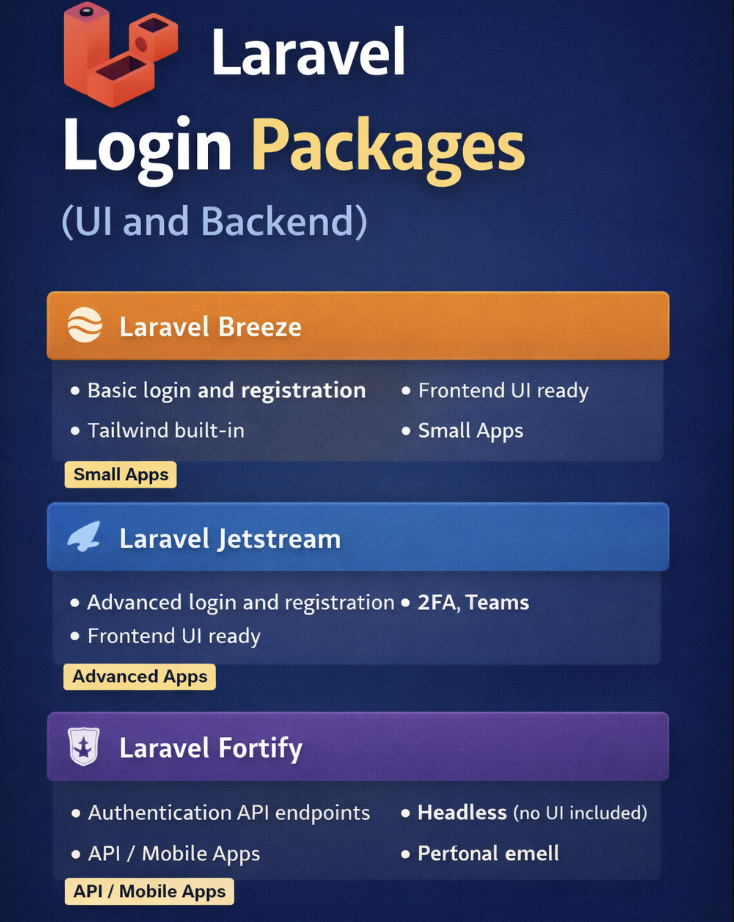
Laravel Login Packages (UI and Backend)
Authentication is one of the most common tasks in any web app: login, registration, password reset, and user management. While Laravel’s default Auth scaffolding is great, sometimes you want a ready-made package that provides both the frontend UI and backend functionality, saving you hours of setup.
1. Laravel Breeze
Overview: Lightweight official Laravel package for authentication. Perfect for small to medium apps.
Features:
-
Login, registration, password reset
-
Email verification
-
Frontend scaffolding using Blade or Inertia.js with Vue
-
Tailwind CSS ready
Installation & Demo:
# 1. Install Breeze
composer require laravel/breeze --dev
# 2. Install Breeze with Blade UI
php artisan breeze:install
# 3. Install frontend dependencies
npm install && npm run dev
# 4. Run migrations
php artisan migrate
# 5. Start server
php artisan serve
✅ Navigate to http://localhost:8000/register or /login to see the fully working UI.
Why use it: Fast, clean, and minimal UI that’s ready for customization.
2. Laravel Jetstream
Overview: A more robust package for medium to large apps with security features like two-factor authentication and team management.
Features:
-
Login, registration, password reset, email verification
-
Two-factor authentication (2FA)
-
Team management
-
Frontend via Blade or Inertia.js (Vue/React)
Installation & Demo:
# 1. Install Jetstream
composer require laravel/jetstream
# 2. Install Jetstream with Livewire or Inertia
php artisan jetstream:install livewire
# OR
php artisan jetstream:install inertia
# 3. Install frontend dependencies
npm install && npm run dev
# 4. Run migrations
php artisan migrate
# 5. Serve the app
php artisan serve
✅ Visit /register or /login to see the complete authentication workflow, including email verification and 2FA setup.
Why use it: Ideal when building secure apps or apps with teams and advanced features.
3. Laravel Fortify
Overview: Backend-only authentication package by Laravel. Perfect for API-driven or mobile-first apps.
Features:
-
Provides backend routes for login, registration, password reset
-
Multi-factor authentication support
-
Works with any frontend framework (Vue, React, Flutter, etc.)
Installation & Demo:
# 1. Install Fortify
composer require laravel/fortify
# 2. Publish configuration
php artisan vendor:publish --provider="Laravel\Fortify\FortifyServiceProvider"
# 3. Enable features in config/fortify.php
'features' => [
Features::registration(),
Features::resetPasswords(),
Features::emailVerification(),
Features::twoFactorAuthentication(),
];
# 4. Run migrations if not done
php artisan migrate
# 5. Serve the app
php artisan serve
✅ Fortify provides API endpoints like /login, /register, /forgot-password that you can call from your frontend (e.g., Vue or Flutter).
Why use it: Perfect for headless apps or custom UI where you control the frontend completely.
Choosing the Right Package
| Package | UI Included | Best For | Extra Features |
|---|---|---|---|
| Breeze | ✅ | Small / Prototype Apps | Lightweight, Tailwind ready |
| Jetstream | ✅ | Medium / Large Apps | 2FA, Teams, Session Management |
| Fortify | ❌ | API-first / Mobile Apps | Backend only, full control of frontend |
Key Takeaways
-
Breeze → Quick, clean, UI + backend
-
Jetstream → Secure, advanced features + UI
-
Fortify → Backend API, use any frontend
Using these packages, you can save hours of coding, follow best practices, and focus on your app’s core features.
If you want, I can also make a small infographic image showing Breeze vs Jetstream vs Fortify, which will make this blog portfolio-ready and visually appealing.
Do you want me to create that infographic next?

Flutter Devs Be Like: “It’s just a widget bro”
If you’ve ever worked with Flutter—or talked to a Flutter developer—you’ve probably heard this phrase at least once:
“It’s just a widget.”
At first, it sounds like an oversimplification. But the more you work with Flutter, the more you realize it’s actually 100% true.
In Flutter, everything is a widget—from a simple text label to complex screens, animations, and even app-level configurations. This mindset is what makes Flutter powerful, flexible, and fun to work with.
Why “It’s Just a Widget”?
Flutter uses a declarative UI approach, meaning:
- UI is built by composing widgets
- Widgets describe what the UI should look like
- When state changes, Flutter rebuilds widgets efficiently
Buttons? Widgets.
Layouts? Widgets.
Padding, alignment, themes, animations? Yep—widgets.
Once you understand widgets, you understand Flutter.
Types of Widgets (Grouped for Sanity)
Let’s break down Flutter widgets into clear, logical groups 👇
Layout Widgets (Structure the UI)
- Row: Arranges widgets horizontally in a single line.
- Column: Arranges widgets vertically in a single line.
- Stack: Places widgets on top of each other.
- Expanded: Forces a widget to take up remaining available space.
- Flexible: Adjusts a widget’s size flexibly within a layout.
- Wrap: Automatically moves widgets to the next line when space runs out.
- Align: Positions a widget within its parent.
- Center: Centers a widget within available space.
- Padding: Adds spacing around a widget.
- SizedBox: Adds fixed spacing or constraints.
UI & Visual Widgets
- Text: Displays styled text on the screen.
- RichText: Displays text with multiple styles in one widget.
- Image: Displays an image from assets, network, or memory.
- Icon: Displays a graphical icon.
- CircleAvatar: Displays a circular image or icon, often used for profiles.
- Container: A versatile widget for styling, sizing, and positioning.
- Card: Displays content inside a Material Design card.
- Divider: Draws a horizontal or vertical separator line.
Navigation & Structure Widgets
- MaterialApp: Sets up app-level navigation, theming, and localization.
- Scaffold: Provides the basic Material Design screen structure.
- AppBar: Displays a top navigation bar with actions.
- BottomNavigationBar: Enables bottom tab navigation.
- Drawer: Displays a side navigation menu.
- TabBar: Displays tabs for navigation.
- TabBarView: Displays content for the selected tab.
- Navigator: Manages app route navigation and screen transitions.
Input & Interaction Widgets
- ElevatedButton: A Material button with elevation.
- TextButton: A flat button for less prominent actions.
- OutlinedButton: A button with an outlined border.
- IconButton: A button that displays an icon.
- TextField: Accepts text input from the user.
- Checkbox: Allows selecting multiple options.
- Switch: Toggles between on and off states.
- Slider: Selects a value from a range.
- DropdownButton: Displays a dropdown menu for selection.
Scrolling & List Widgets
- ListView: Displays a scrollable list of widgets.
- GridView: Displays items in a scrollable grid layout.
- PageView: Enables swipe-based page navigation.
- SingleChildScrollView: Makes a single widget scrollable.
- CustomScrollView: Creates custom scroll effects using slivers.
State & Utility Widgets
- StatelessWidget: Builds UI that does not change over time.
- StatefulWidget: Builds UI that updates based on state changes.
- FutureBuilder: Builds UI based on asynchronous data.
- StreamBuilder: Builds UI based on real-time stream updates.
- LayoutBuilder: Builds UI based on parent layout constraints.
- MediaQuery: Provides screen size and orientation information.
Animation Widgets
- AnimatedContainer: Animates changes in size, color, and shape.
- AnimatedOpacity: Animates opacity changes smoothly.
- AnimatedSwitcher: Animates transitions between widgets.
- Hero: Creates shared element animations between screens.
Platform & Adaptive Widgets
- CupertinoButton: An iOS-style button.
- CupertinoNavigationBar: An iOS-style navigation bar.
- SafeArea: Avoids system UI overlaps like notches.
- OrientationBuilder: Builds UI based on device orientation.
If you want, I can also convert this into a Markdown blog, portfolio-ready format, or add code examples next
Final Thought: Why Flutter Devs Love Widgets
Flutter developers say “It’s just a widget” because:
- Widgets are composable
- Widgets are reusable
- Widgets make UI predictable
- Widgets scale from small to complex apps
Once you stop fighting widgets and start thinking in widgets, Flutter becomes incredibly intuitive.
So next time something feels complex—
Take a breath and say it with confidence:
“Relax bro… it’s just a widget.”